Showing posts with label Oracle-SOA-Security. Show all posts

Sunday, December 30, 2012

OFM 10.3.6: Java code to view the contents of a Java Key Store (JKS)

OFM 10.3.6: Java code to view the contents of a Java Key Store (JKS)

package mindtelligent.custom.jks;

import java.io.File;
import java.io.FileInputStream;

import java.io.FileNotFoundException;
import java.io.IOException;
import java.io.InputStream;

import java.security.KeyStore;

import java.security.KeyStoreException;
import java.security.NoSuchAlgorithmException;

import java.security.cert.Certificate;

import java.util.Enumeration;

public class ViewJKSAlias {

    private static InputStream is = null;

    public static void main(String[] args) {
        try {

            File file =
                new File("C:\\MindTelligent\\JavaKeyStore\\MindTelligentKeyStore.jks");
            is = new FileInputStream(file);
            KeyStore keystore =
                KeyStore.getInstance(KeyStore.getDefaultType());
            String password = "weblogic01";
            keystore.load(is, password.toCharArray());


            Enumeration enumeration = keystore.aliases();
            while (enumeration.hasMoreElements()) {
                String alias = (String)enumeration.nextElement();
                System.out.println("alias name: " + alias);
                Certificate certificate = keystore.getCertificate(alias);
                System.out.println(certificate.toString());

            }

        } catch (java.security.cert.CertificateException e) {
            e.printStackTrace();
        } catch (NoSuchAlgorithmException e) {
            e.printStackTrace();
        } catch (FileNotFoundException e) {
            e.printStackTrace();
        } catch (KeyStoreException e) {
            e.printStackTrace();
        } catch (IOException e) {
            e.printStackTrace();
        } finally {
            if (null != is)
                try {
                    is.close();
                } catch (IOException e) {
                    // TODO Auto-generated catch block
                    e.printStackTrace();
                }
        }
    }
}

Monday, June 4, 2012

How Oracle WSM Locates Keystore And Key Passwords


How Oracle WSM (Oracle Web Service Manager) Locates Keystore And Key Passwords

Oracle WSM expects keystore and key passwords to be in the Credential Store Framework (CSF). Here is how it works.
  • A JKS keystore file is protected by a keystore password.
  • A keystore file consists of zero or more private keys, and zero or more trusted certificates. Each private key has its own password, (although it is common to set the key passwords to be the same as the keystore password). Oracle WSM needs to know both the keystore password and key password.
  • The CSF consists of many maps, each with a distinct name. Oracle WSM only uses the map oracle.wsm.security.
  • Inside each map is a mapping from multiple csf-key entries to corresponding credentials. A csf-key is just a simple name, but there can be many different types of credentials. The most common type of credential is a password credential which is primarily comprised of a username and a password.
    Oracle WSM refers to the following csf-keys inside the oracle.wsm.security map:
    • keystore-csf-key - This key should contain the keystore password. The username is ignored.
    • enc-csf-key - This key should contain the encryption key alias as the username, and the corresponding key password.
    • sign-csf-key - This key should contain the signature key alias as the username, and the corresponding key password.
    In addition to these csf-keys, you should add a csf-key entry for every new private key that you want Oracle WSM to use, for example when you want to specify signature and encryption keys in configuration overrides.
Figure  illustrates the relationship between the keystore configuration in the OPSS, the oracle.wsm.security map in the credential store, and the Oracle WSM Java keystore.

Figure 10-8 Oracle WSM Keystore Configuration for Message Protection
Description of Figure 10-8 follows
As shown in the figure:
  • The keystore.csf.map property points to the Oracle WSM map in the credential store that contains the CSF aliases. In this case keystore.csf.map is defined as the recommended name oracle.wsm.security, but it can be any value.
  • The keystore.pass.csf.key property points to the CSF alias keystore-csf-key that is mapped to the username and password of the keystore. Only the password is used; username is redundant in the case of the keystore.
  • The keystore.sig.csf.key property points to the CSF alias sign-csf-key that is mapped to the username and password of the private key that is used for signing.
  • The keystore.enc.csf.key property points to the CSF alias enc-csf-key that is mapped to the username and password of the private key that is used for decryption.

Monday, May 7, 2012

Oracle Fusion Middleware Security for Web Services 11g Release 1 (11.1.1.6) Policy Sets

Oracle Fusion Middleware Security  for Web Services 11g Release 1 (11.1.1.6) Policy Sets

Policy sets provide a means to attach policies globally to a range of endpoints of the same type. 


  • In addition to attaching policies directly to endpoints, you can create policy sets that allow you to attach policies globally to a range of endpoints of the same type, regardless of the deployment state. You can create and manage policy sets using both Fusion Middleware Control and the WebLogic Scripting Tool, WLST. 
  • Attaching policies globally using policy sets allows an administrator to ensure that all subjects are secured in situations where the developer, assembler, or deployer did not explicitly specify the policies to be attached.
  • Policies attached globally using policy sets also provide the following:
    • Override the policies
    • Specify run time constraint
  • Policy subjects to which policy sets can be attached include SOA components, SOA service endpoints, SOA references, Web services endpoints, Web service clients, Web service connections, and asynchronous callback clients. Policy sets can be attached at the following scopes:
    • Domain — all policy subjects of the specified type in a domain
    • Server instance—all policy subjects of the specified type in a server instance
    • Application or Partition—all policy subjects of the specified type in an application or SOA partition
    • Application module or SOA composite—all policy subjects of the specified type in an application module or SOA composite
    • Service or reference—all policy subjects of the specified type in a SOA service or reference
    • Port or component—all policy subjects of the specified type in a port or SOA component

    Creating a Policy Set


    • Navigate to the Policy Set Summary page.


    • From the Policy Set Summary page, click Create.
    • In the Enter General Information page, as shown in enter a name for the policy set.
    • Select the Enabled check box if you want to enable the policy set.
    • In the Type of Resources field, select the type of policy subject to which you want to attach policies. On the next page you define the scope of resources to which you want the policy set to apply. The type of policy subjects that you can select are as follows:
      • SOA Component
      • SOA Service
      • SOA Reference
      • Web Service Connection
      • Web Service Endpoint
      • Web Service Client
      • Asynchronous Callback Client
      • Press Next on the Top Right


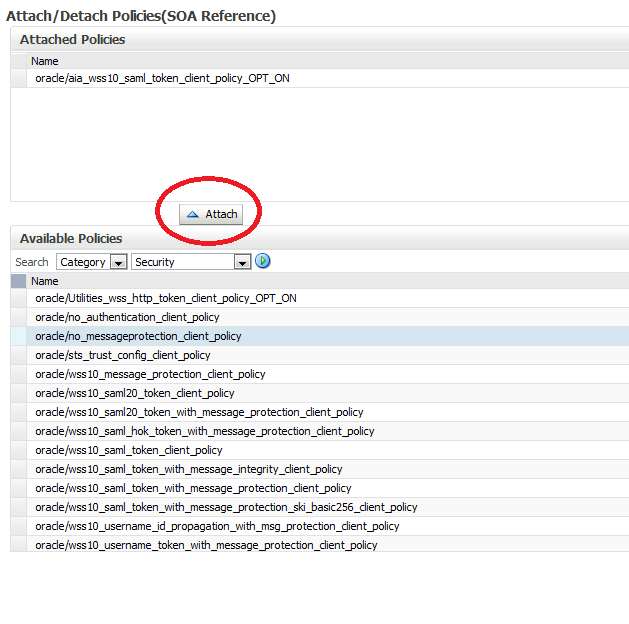
    • Attach the policies and selecting the policy and pressing the Attach button; press Next

    Sunday, April 1, 2012

    OSB (Oracle Service Bus) 11.1.1.6 Call REST ful Services

    OSB (Oracle Service Bus) 11.1.1.6 Call REST ful Services from OSB

    For details on how to create a Proxy Service and Business Services along with OSB security, please refer to my earlier posts on on OSB Tutorial: How to create proxy and business service by clicking here.

    • Create a Project as shown below.
     
    • Create a new business service, name it CustomerService. 

    • Create a new business service, name it CustomerService.


    •  Choose this service to be a Messaging Service.


    • Choose the request and response payload to be of XML type


    • Click next and choose "basic" authentication if authentication is required.
    • Choose a service account for credentials.
    • Save and Activate session

    How IdP Groups Are Tied to Databricks Groups (Unity Catalog)

      🔗 How IdP Groups Are Tied to Databricks Groups (Unity Catalog) 🔑 Key Principle (Read This First) Databricks does NOT “map” IdP groups...