Wednesday, February 28, 2018

SpringBoot Externalization Part 1: Develop Externalization Server

Spring Boot lets you externalize your configuration so that you can work with the same application code in different environments. You can use properties files, YAML files, environment variables, and command-line arguments to externalize configuration. Property values can be injected directly into your beans by using the @Valueannotation, accessed through Spring’s Environment abstraction, or be bound to structured objects through @ConfigurationProperties.


This thread discusses connection of Spring Externalization Config Server and it caches the properties from Git Hub.

The properties files are in YAML format that are stored on GIT. 


 MindTelligentExternalizationApplication Server Configuration:


import org.springframework.boot.SpringApplication;
import org.springframework.boot.autoconfigure.SpringBootApplication;
import org.springframework.cloud.config.server.EnableConfigServer;

@EnableConfigServer
@SpringBootApplication
public class MindTelligentExternalizationApplication {

public static void main(String[] args) 
{
SpringApplication.run(MindTelligentExternalizationApplication .class, args);
}

}


Package the code with application.yml file:


server:
  port: 8888
spring:
  cloud:
    config:
      server:
        git:
          uri:  https://hsingh@github.com/ymlbranch
          searchPaths: src
          username: hsingh@MindTelligent.com

          password: XXXXXXXX 


Build the Code with Maven:


<?xml version="1.0" encoding="UTF-8"?>
<project xmlns="http://maven.apache.org/POM/4.0.0" xmlns:xsi="http://www.w3.org/2001/XMLSchema-instance"
    xsi:schemaLocation="http://maven.apache.org/POM/4.0.0 http://maven.apache.org/xsd/maven-4.0.0.xsd">
    <modelVersion>4.0.0</modelVersion>

    <groupId>com.mindtelligent.github.server</groupId>
    <artifactId>MindTelligentIotConfigurationService</artifactId>
    <version>0.0.1-SNAPSHOT</version>
    <packaging>jar</packaging>

    <parent>
        <groupId>org.springframework.boot</groupId>
        <artifactId>spring-boot-starter-parent</artifactId>
        <version>2.0.0.RELEASE</version>
        <relativePath /> <!-- lookup parent from repository -->
    </parent>

    <properties>
        <project.build.sourceEncoding>UTF-8</project.build.sourceEncoding>
        <java.version>1.8</java.version>
    </properties>

    <dependencies>
        <dependency>
            <groupId>org.springframework.cloud</groupId>
            <artifactId>spring-cloud-config-server</artifactId>
        </dependency>

        <dependency>
            <groupId>org.springframework.boot</groupId>
            <artifactId>spring-boot-starter-test</artifactId>
            <scope>test</scope>
        </dependency>
    </dependencies>

    <dependencyManagement>
        <dependencies>
            <dependency>
                <groupId>org.springframework.cloud</groupId>
                <artifactId>spring-cloud-dependencies</artifactId>
                <version>Finchley.M8</version>
                <type>pom</type>
                <scope>import</scope>
            </dependency>
        </dependencies>
    </dependencyManagement>

    <build>
        <plugins>
            <plugin>
                <groupId>org.springframework.boot</groupId>
                <artifactId>spring-boot-maven-plugin</artifactId>
            </plugin>
        </plugins>
    </build>

    <repositories>
        <repository>
            <id>spring-milestones</id>
            <name>Spring Milestones</name>
            <url>https://repo.spring.io/libs-milestone</url>
            <snapshots>
                <enabled>false</enabled>
            </snapshots>
        </repository>
    </repositories>


</project>


  • Once this is built. Run the JAR file with the command
java -jar MindTelligentIotConfigurationService-0.0.1-SNAPSHOT.jar

Log on to the browser and validate by:

http://hostname:8888/yml_file/default

You should be able to see the contents on the browser.


Saturday, February 3, 2018

Important Kafka Commands

Important Kafka Commands

MindTelligent has developed an open source Kafka Administration Framework. This framework monitors the health of Kafka And Zookeeper nodes. It also ships a bunch of important Kafka commands.


These commands can be executed from $KAFKA_HOME/bin directory


Command to Set the Kafka Topic retention Period for 10 days:


./kafka-topics.sh --zookeeper localhost:2181 --alter --topic mindtelligent_topic  --config retention.ms=864000000

Command to Set Kafka Kafka partitions to 6 :


./kafka-topics.sh --zookeeper localhost:2181 --alter --topic mindtelligent_topic --partitions 6

Command to View offsets for the Kafka Consumer Group and instances for a consumer group:


./kafka-consumer-groups.sh --bootstrap-server localhost:9092 --describe --group mindtelligent_topic_group


Command to list all Kafka Consumer Groups across all topics:

./kafka-consumer-groups.sh --bootstrap-server localhost:9092 --list


Command to set the Kafka Offset to earliest:


./kafka-consumer-groups.sh --bootstrap-server localhost:9092 --group mindtelligent_topic_group --reset-offsets --to-earliest --topic mindtelligent_topic --execute


Command to set the Kafka Offset to Latest:


./kafka-consumer-groups.sh --bootstrap-server localhost:9092 --group mindtelligent_topic_group --reset-offsets --to-latest --topic mindtelligent_topic --execute

List Kafka Topic:


./kafka-topics.sh --zookeeper localhost:2181 --list


Describe a Kafka Topic:


./kafka-topics.sh --zookeeper localhost:2181 --describe --topic mindtelligent_topic

Purge a Kafka Topic:


./kafka-topics.sh --zookeeper localhost:2181 --alter --topic mindtelligent_topic--config retention.ms=1000

Delete a Kafka Topic: 

./kafka-topics.sh --zookeeper localhost:2181 --delete --topic mindtelligent_topic

Get Number of Messages in a Kafka Toipc:


./kafka-run-class.sh kafka.tools.GetOffsetShell --broker-list localhost:9092 --topic mindtelligent_topic--time -1 --offsets 1 | awk -F ":" '{sum += $3} END {print sum}'


Get the earliest offset still in a topic:

./kafka-run-class.sh kafka.tools.GetOffsetShell --broker-list localhost:9092 --topic mindtelligent_topic  --time -2

Get the latest offset still in a topic:

./kafka-run-class.sh kafka.tools.GetOffsetShell --broker-list localhost:9092 --topic mindtelligent_topic --time -1


Friday, January 12, 2018

ForgeRock: Open AM. Install Open AM 5.5 with Tomcat 8.0 - Part 1- Install Tomcat

This BLOG thread discusses on steps to install and configure Open AM 5.5 with Tomcat 8.0.


  • Install Tomcat.

You can always find the latest stable version of Apache Tomcat 8 from its official download page, which is 8.0.33 as of writing.
    • Under the "Binary Distributions" section and then the "Core" list, use the link pointing to the "tar.gz" archive to compose a wget command: 


  • Execute the command 

sudo tar -zxvf apache-tomcat-8.5.24.tar.gz -C /opt/tomcat --strip-components=1


  • Prior to running Apache Tomcat, you need to setup proper permissions for several directories:

cd /opt/tomcat
sudo chgrp -R tomcat conf
sudo chmod g+rwx conf
sudo chmod g+r conf/*
sudo chown -R tomcat logs/ temp/ webapps/ work/

sudo chgrp -R tomcat bin
sudo chgrp -R tomcat lib
sudo chmod g+rwx bin
sudo chmod g+r bin/*


Monday, January 1, 2018

JDeveloper Composite deployment with SOA 2 way SSL with SHA256 certificates.

For SOA managed servers secured with SHA256 certificates and if SSL port is enabled, developers face an issue when deploying composites from JDeveloper. This issue is caused due to SSL Handshake Exception.

To resolve this issue:


  • Please ensure that you have the public root certificate chain in your cacerts trust store.
  • Please edit the jdev.conf files in the $JDEV HOME/jdev/bin directory and add the property
AddVMOption -Dweblogic.security.SSL.enableJSSE=true 


  • Restart JDeveloper and you will see the deployment issue is resolved.

Wednesday, November 8, 2017

ForgeRock IAM : OpenDS (Open Directory Server). Importing LDIF files

The most efficient method of importing LDIF data is to take the OpenDJ server offline. Alternatively, you can schedule a task to import the data while the server is online.


Importing from LDIF overwrites all data in the target backend with entries from the LDIF data.


In this thread, i am using cygwin to import the Data into OpenDS. Open DS is running on Widows server.


./import-ldif.bat --hostname "Mindtelligent-T7EJ1A7" --port 4444 --bindDN "cn=Directory Manager" --bindPassword password --backendID userRoot --includeBranch dc=example,dc=com --ldifFile c:\\Users\\hsing\\Downloads\\Example.ldif  --trustAll


I use Apache Directory Server validate if import is successful. 


Wednesday, October 18, 2017

Oracle Event Hub Cloud Service: Oracle Kafka Solution

Oracle Event Hub Cloud Service delivers the power of Kafka as a managed streaming data platform integrated into the Oracle Cloud ecosystem. Create Topics and start streaming or manage and deploy your own Dedicated Kafka Cluster with Elastic Scalability.
Perform the following steps to create an Oracle Event Hub Cloud Service - Topic instance. You can skip this section, if you already have an Oracle Event Hub Cloud Service - Topic instance and plan to use that for this demo.
  1. Log in to your Oracle Event Hub Cloud Service - Topic account.
  2. In the Services page, click Create Service.
  3. The Create Service screen appears. Provide the following details and click Next.
    • Service Name: topicdemo
    • Service Description: Example to demo topic
    • Hosted On: platformdemo
    • Number of Partitions: 2
    • Retention Period (Hours): 24
    Service page of Create Service wizard
     
    Note: The platformdemo is the name of the Oracle Event Hub Cloud Service - Platform cluster in which the topic will be created. You can provide a different name if you want to host this in a different Oracle Event Hub Cloud - Platfrom cluster.
  4. In the Confirm page, if you find the details appropriate, click Create.
    Confirmation page of Create Service wizard
     
  5. The control returns to the Services page. In the Services page, you could now see the new topicdemo service listed.
    Services page
     
  6. Click on the Event Hub icon adjacent to the topicdemo instance to go to the Service Overview page.
  7. In the Service Overview page, observe the Topic field. This is the name of the Topic service that will be used in programs demonstrated in this tutorial.
    Service Overview page
     

References: Oracle Technetwork


Monday, October 16, 2017

Apache Kafka and Apache Spark: A "Data Science Match" made in heaven.

Kafka is a publish-subscribe messaging system that provides a reliable Spark Streaming
source. The Kafka project introduced a new consumer API between versions 0.8 and 0.10, so there are 2 separate corresponding Spark Streaming packages available. The API provides one-to-one mapping between Kafka's partition and the DStream generated RDDs partition along with access to metadata and offset.


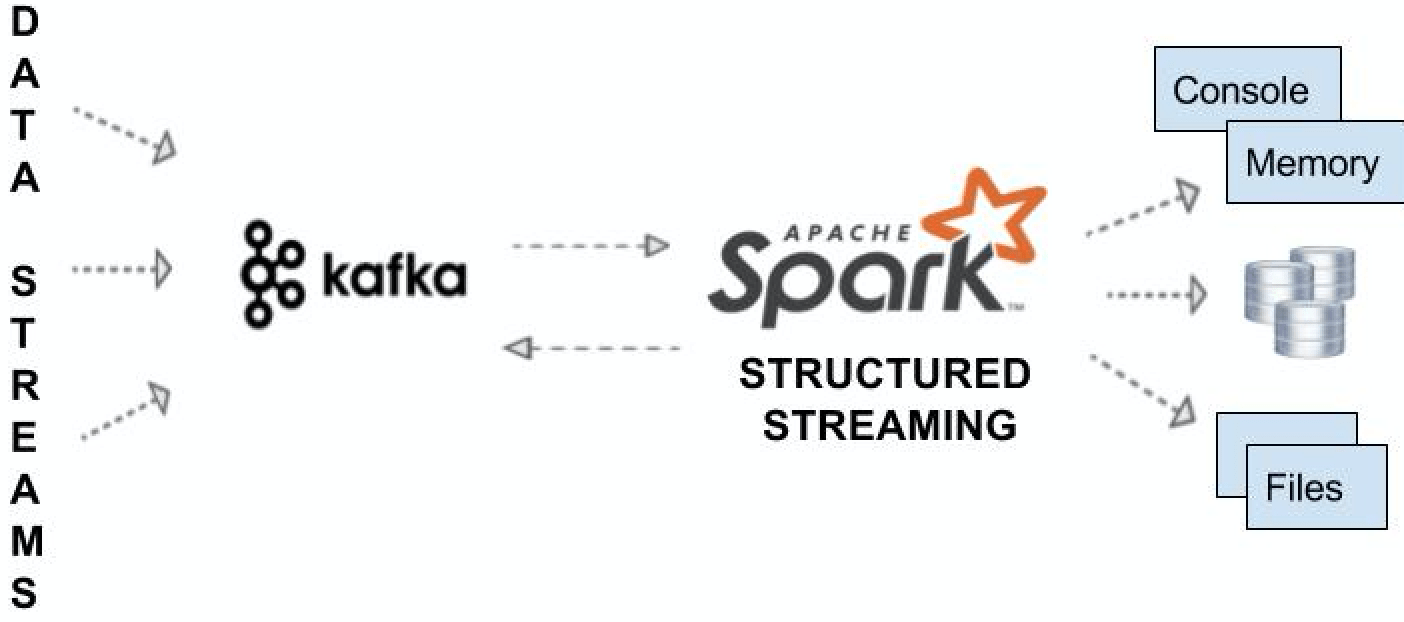
The following diagram shows end-to-end integration with Kafka, consuming messages from it, doing simple to complex windowing ETL, and pushing the desired output to various sinks such as memory, console, file, databases, and back to Kafka itself.


An overview of what our end-to-end integration will look like.


Following set of properties will need to be added to Spark Streaming API to integrate Kafka with Spark as a Source

bootstrap.servers: This describes the host and port of Kafka server(s) separated by a comma.

key.deserializer: This is the name of the class to deserialize the key of the messages from Kafka.

value.deserializer: This refers to the class that deserializes the value of the message.

group.id: This uniquely identifies the group of consumer.

auto.offset.reset: This is used messages are consumed from a topic in Kafka, but does not have initial offset in Kafka or if the current offset does not exist anymore on the server then one of the following options helps.


How IdP Groups Are Tied to Databricks Groups (Unity Catalog)

  🔗 How IdP Groups Are Tied to Databricks Groups (Unity Catalog) 🔑 Key Principle (Read This First) Databricks does NOT “map” IdP groups...